
Free & Open Source

AI Translation
Built for Real Work

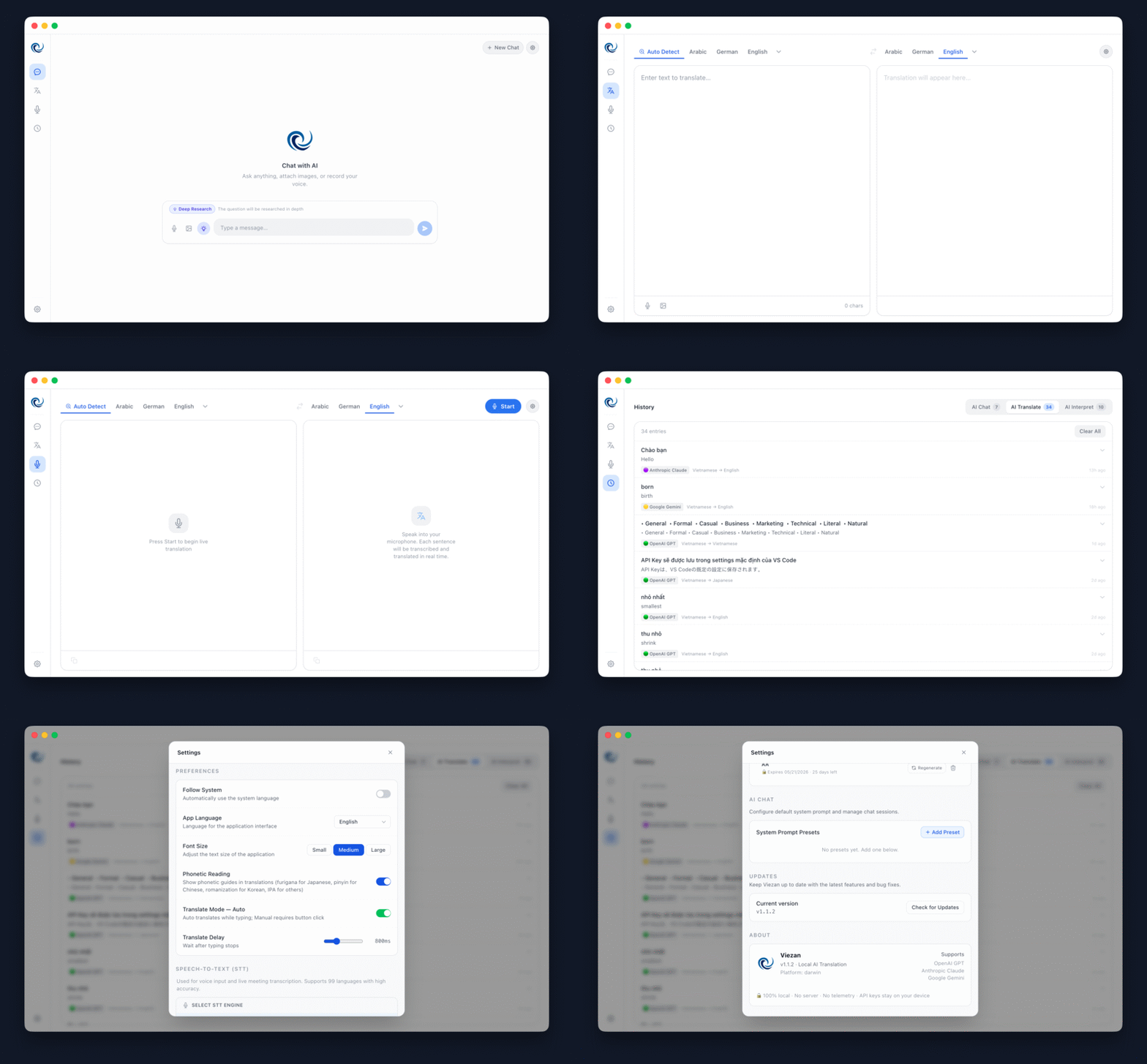
Real-time translation, live subtitles, image translation, and AI chat — all running 100% locally on your machine. No server. No data leaks. Just you and AI.

Viezan app screenshot
Powered by world-class AI providers
Gemini Google Gemini
Anthropic Anthropic Claude
OpenAI OpenAI GPT

Features

Everything you need to
communicate without barriers

Viezan packs a full translation suite into one elegant desktop app — no subscriptions, no tracking, just tools that work.

🌐

Text Translation

Translate with 7 tone styles — Neutral, Friendly, Professional, Business, Slack, Polite, Technical. Auto or manual mode. 19 languages supported.

Core
🎙️

Live Translation

Real-time subtitles from microphone or system audio. Floating overlay with custom font size, color, and opacity. AI session summary after each call.

Real-time
🖼️

Image Translation

Drag-and-drop or paste any image. AI Vision extracts and translates all text — documents, screenshots, menus, slides — and lets you download the result.

AI Vision
🤖

AI Chat

Full-featured AI chat with image attachments, voice input, custom System Prompts, preset templates, web search, and complete searchable chat history.

Assistant
🔊

Voice I/O

Voice Input via Web Speech API, OpenAI Whisper, and Groq as fallback. Text-to-Speech with 6 premium OpenAI voices: Alloy, Echo, Fable, Onyx, Nova, Shimmer.

Audio
🇯🇵

Furigana Support

Automatic furigana overlay on Japanese translations. Essential for learners, BrSE, and anyone working daily with Japanese text.

Japanese
🧩

Chrome Extension

Translate selected text directly in your browser. Alt+T shortcut for instant translation, platform-aware hints, redesigned two-column popup UI.

Browser
⌨️

Global Hotkey

Summon Viezan from any application with a global keyboard shortcut. No need to switch apps mid-workflow.

Productivity
🔒

Privacy First

API keys encrypted via Electron safeStorage — Keychain on macOS, Credential Manager on Windows. No file writes. Zero servers. 100% local.

Security
⚙️

Settings Modal

Settings redesigned as a clean popup overlay — access API keys, model preferences and extension settings instantly from any tab without losing context.

UX
📢

Phonetic Mode

Pure phonetic transcription mode — get romanization or phonetics instead of a full translation. Perfect for pronunciation learning and language study.

Translate
🔍

Web Search in Chat

AI Chat with real-time web search powered by Brave, DuckDuckGo or Google — automatic fallback ensures you always get results.

Chat
🧠

Local AI Support

Run AI models directly on your machine — no API key required. Free for everyone, fully offline. No cloud, no cost, complete privacy.

Coming Soon

See it in action

Click any card to zoom in. Navigate with arrow keys or swipe on mobile.

Built by a BrSE,
for the whole team

Working as a BrSE/PM at a Japanese product company, I watched information get lost in translation chains — IT Comtors, BAs, BrSEs all passing context along until the original meaning was gone, costing hours of extra meetings.

With the spirit of "工夫" — always finding a way to improve — I built Viezan: a tool that lets everyone communicate directly with AI translation, no intermediary needed.

The app runs 100% on your machine. I only use provider APIs to call models. No intermediate server. No data passes through my systems. Your conversations stay yours.

🌏

19 Languages Supported

From Vietnamese, Japanese, English to Korean, Chinese, French and more.

🎨

3 UI Languages

Interface available in Vietnamese, English, and Japanese — auto dark mode included.

Smart Model Suggestions

Viezan automatically recommends the best AI model for each task type.

🆓

100% Free to Download

No subscription. You only pay for the AI API calls you choose to make.

🚀

Local AI Coming Soon

A free local AI version for users without API keys — in development now.

Get Viezan for free

Available for macOS, Windows and Linux. No account required. Start translating in minutes.

macOS

Apple Silicon & Intel
⬇ Download .dmg

Windows

Windows 10 / 11
⬇ Download .exe

Linux

x64 AppImage
⬇ Download .AppImage

Chrome Extension

Manual Install
⬇ Download .crx

⚠️ macOS may show a security warning since the app isn't code-signed yet. Right-click → Open to bypass. See instructions →

Enjoying Viezan?

Viezan is free and built in my spare time. If it saves you time or helps your team communicate better, a coffee goes a long way toward code signing, local AI, and new features. ☕

Buy me a coffee via Momo